User Guide
ArchDuke is an application to help students manage student contacts, groups, and group tasks, optimized for use via a Command Line Interface (CLI) while still having the benefits of a Graphical User Interface (GUI). This product is also optimized for students to update and keep track of members of student groups and tasks in each group. If you can type fast, ArchDuke can get your contact management, group management, and task management done faster than traditional GUI apps.
- Quick start
- Features
Quick start
-
Ensure you have Java
11or above installed in your Computer. -
Download the latest
archduke.jarfrom here. -
Copy the file to the folder you want to use as the home folder for your ArchDuke.
-
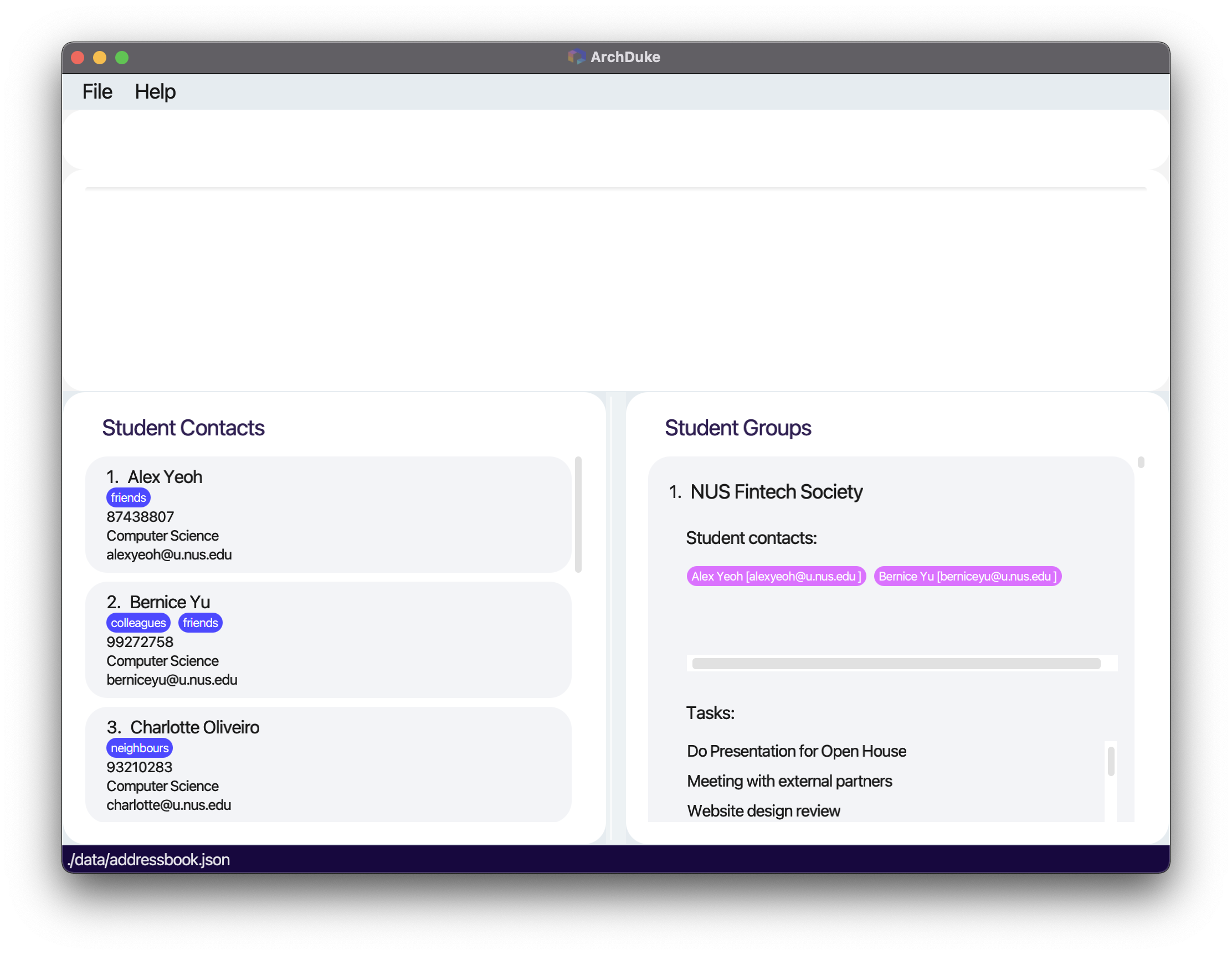
Double-click the file to start the app. The GUI similar to the below should appear in a few seconds. Note how the app contains some sample data.
-
Type the command in the command box and press Enter to execute it. e.g. typing
helpand pressing Enter will open the help window.
Some example commands you can try:-
list: Lists all student contacts. -
addn/John Doe p/12345678 e/johndoe@u.nus.edu a/Computer Science t/friends: Adds a contact namedJohn Doeto ArchDuke. -
clear: Deletes all entries in ArchDuke. -
exit: Exits the app.
-
-
Refer to the Features below for details of each command.
Features
 Notes about the command format:
-
Words in
UPPER_CASEare the parameters to be supplied by the user.
e.g. inadd n/NAME,NAMEis a parameter which can be used asadd n/John Doe. -
Items in square brackets are optional.
e.gn/NAME [t/TAG]can be used asn/John Doe t/friendor asn/John Doe. -
Items with
… after them can be used multiple times including zero times.
e.g.[t/TAG]…can be used ast/friend,t/friend t/familyetc. -
Parameters can be in any order.
e.g. if the command specifiesn/NAME p/PHONE_NUMBER,p/PHONE_NUMBER n/NAMEis also acceptable. -
If a parameter is expected only once in the command but you specified it multiple times, only the last occurrence of the parameter will be taken.
e.g. if you specifyp/12341234 p/56785678, onlyp/56785678will be taken. -
Extraneous parameters for commands that do not take in parameters (such as
help,list,exitandclear) will be ignored.
e.g. if the command specifieshelp 123, it will be interpreted ashelp.
General Features
Viewing help : help
Shows a message explaining how to access the help page and shows the format of all commands.
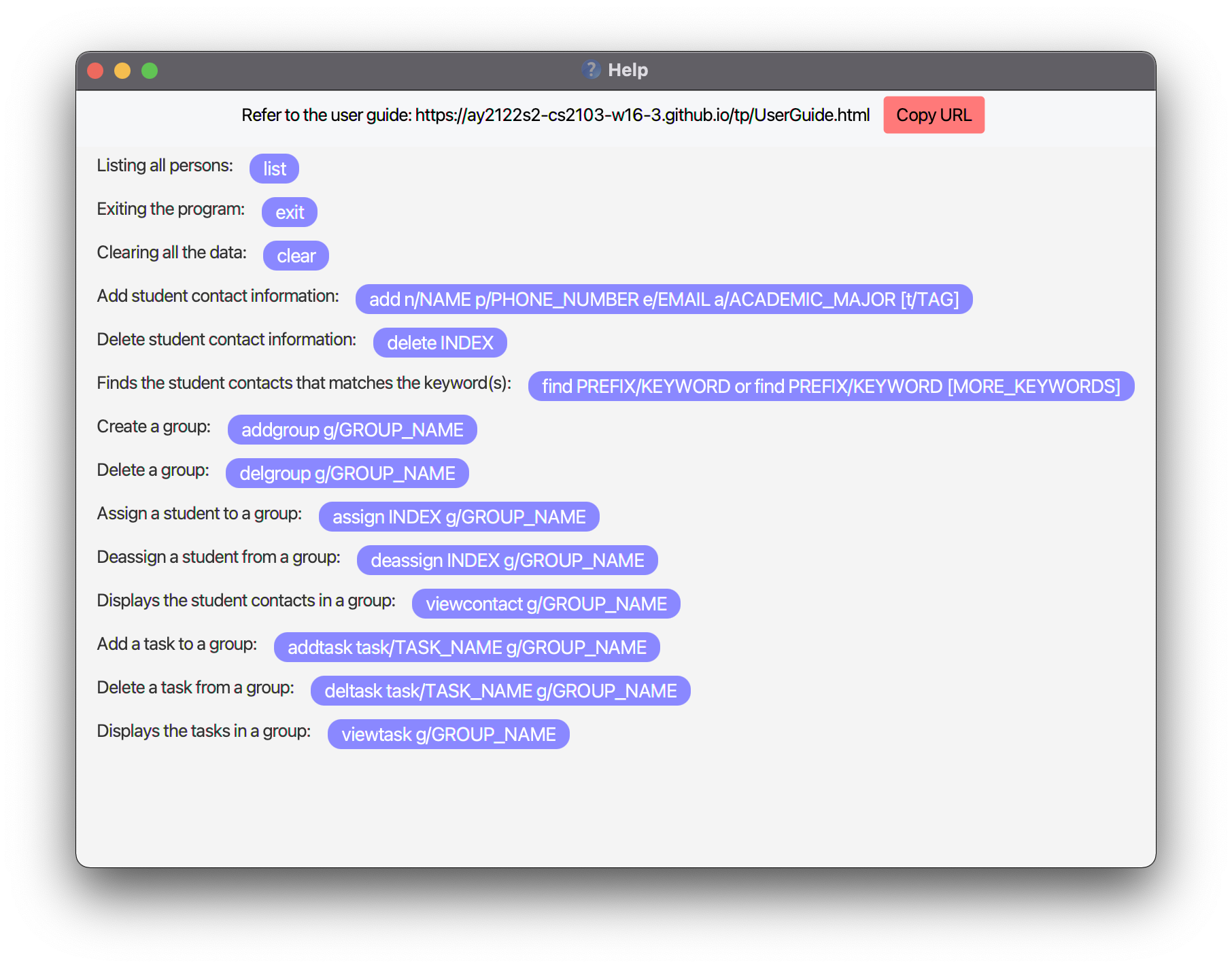
Format: help
Listing all persons : list
Shows a list of all student contacts in ArchDuke. This command is often used to return back to the student contact list.
Format: list
Clearing all entries: clear
Clears all entries from ArchDuke.
Format: clear
Exiting the program : exit
Exits the program.
Format: exit
Saving the data
ArchDuke data are saved in the hard disk automatically after any command that changes the data. There is no need to save manually.
Student Contact Management
Add student contact information: add
Adds a student contact information to ArchDuke. add must be followed by the student’s NAME,
PHONE_NUMBER, EMAIL, and ACADEMIC_MAJOR. TAG is optional and is one word consisting of letters and/or numerals (alphanumeric).
TAG is case-sensitive.
Format: add n/NAME p/PHONE_NUMBER e/EMAIL a/ACADEMIC_MAJOR [t/TAG]...
- Adds a student contact with the following attributes to the student contact list.
Note:
A student contact can only be added if it has yet to exist in ArchDuke. The student contact
is uniquely identified by his PHONE_NUMER and/or EMAIL with no regards to case sensitivity. E.g. example@u.nus.edu would be the
same email as Example@u.nus.edu as in the real-word, emails are usually not case-sensitive.
Tip:
A student contact can have any number of tags (including 0). Same tags (case-sensitive) can only be added to a particular student contact once.
| Parameter | Representation | Constraints |
|---|---|---|
NAME |
Name of the student contact | Should only contain alphanumeric characters and should not be blank |
PHONE_NUMBER |
Phone number of the student contact | Should only contain numbers and should be at least 3 digits long |
EMAIL |
Email of the student contact | Emails should be of the format local-part@domain and adhere to the following constraints: 1. The local-part should only contain alphanumeric characters and these special characters, excluding the parentheses, (+_.-). The local-part may not start or end with any special characters. 2. This is followed by a ‘@’ and then a domain name. The domain name is made up of domain labels separated by periods. The domain name must: - end with a domain label at least 2 characters long - have each domain label start and end with alphanumeric characters - have each domain label consist of alphanumeric characters, separated only by hyphens, if any |
ACADEMIC_MAJOR |
Academic Major of the student contact | Should not be blank |
TAG |
Tag(s) of the student contact | One word and only contain alphanumeric characters |
Example:
add n/John Doe p/12345678 e/johndoe@u.nus.edu a/Computer Science t/friendsadd n/Joel Lee p/87654321 e/joellee@u.nus.edu a/Information Systems
Expected outcome:
- Student’s contact information is visible in ArchDuke and added to student contact list.
Delete student contact information: delete
Deletes a student’s contact information at the specified INDEX from ArchDuke.
The INDEX refers to the index number shown in the currently displayed student contact list.
The INDEX must be a positive unsigned integer not exceeding the total number of currently displayed student contacts. The deleted student contact would also be
deleted from all his currently assigned groups.
Format: delete INDEX
- Deletes the student contact at that
INDEXfrom the student contact list.
| Parameter | Representation | Constraints |
|---|---|---|
INDEX |
The number in front of the student contact | Must be positive unsigned integer and must not exceed the size of the current student contact list |
Example:
delete 1-
listfollowed bydelete 2deletes the second person in the current list from ArchDuke. -
find n/Bernicefollowed bydelete 1deletes the first person in the current resulting list of thefindcommand.
Expected outcome:
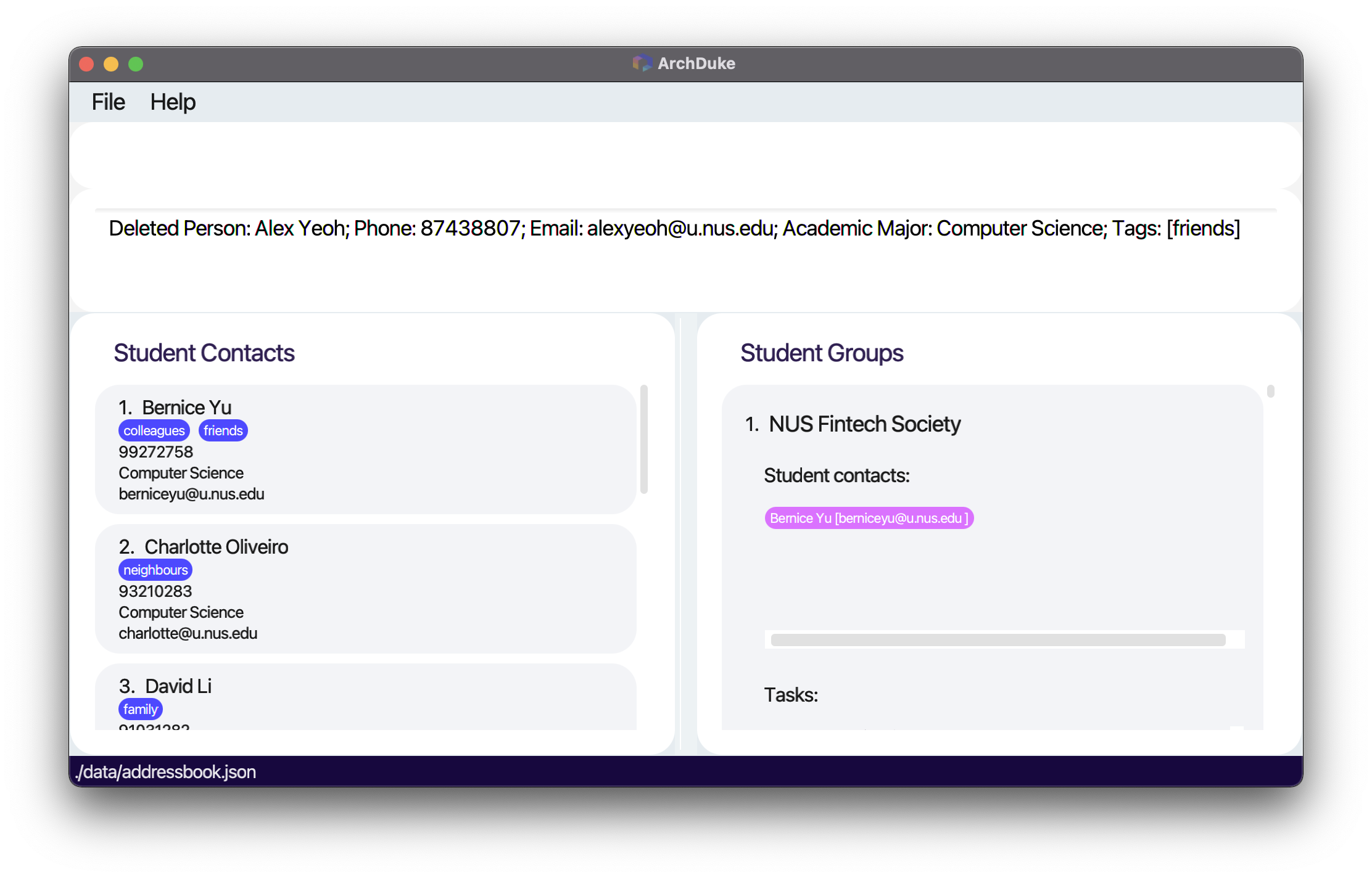
- The student contact is removed from ArchDuke. The student contact is also removed from all previously assigned groups.
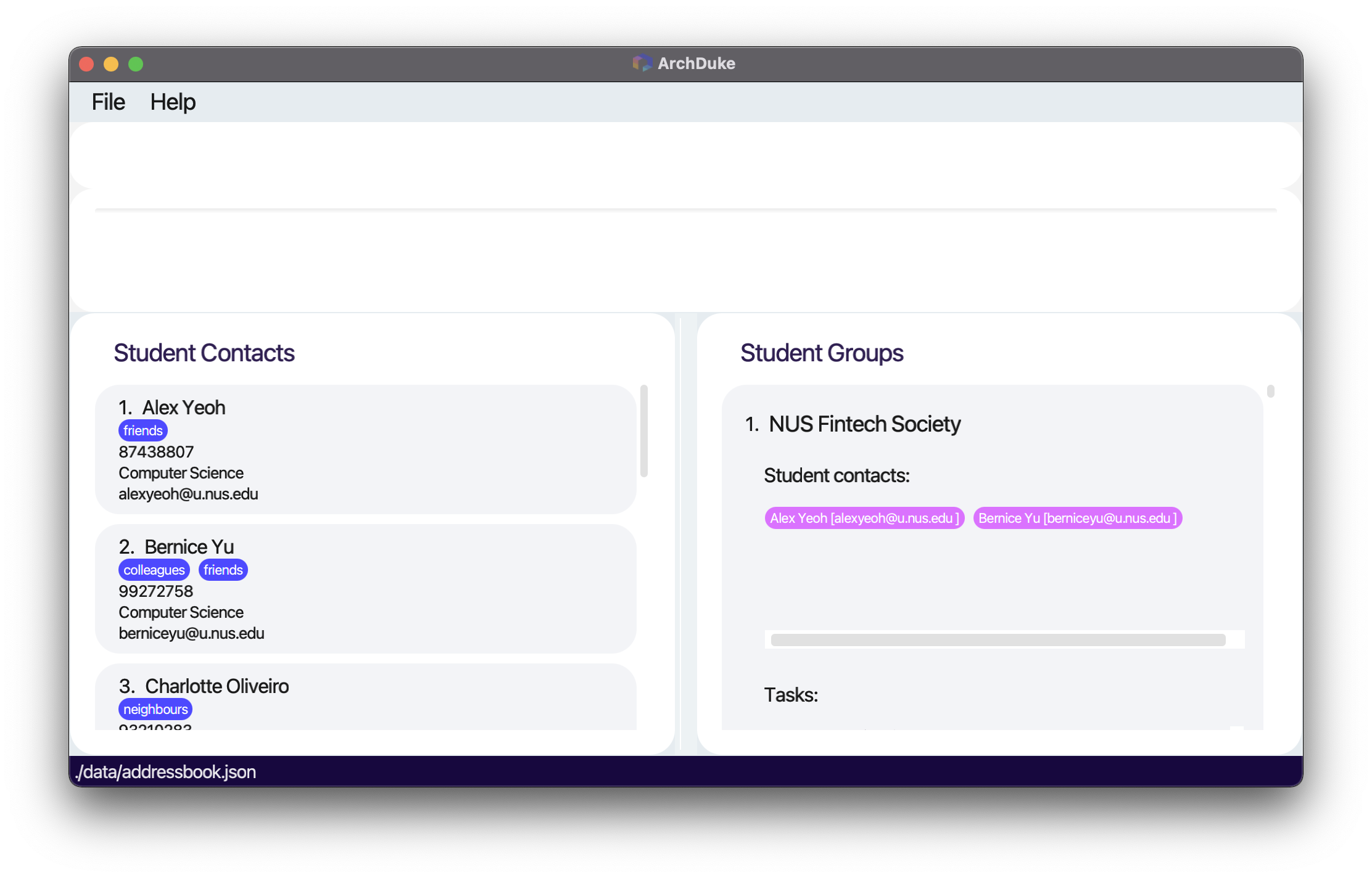
Before deleting Alex Yeoh at index 1:
After deleting Alex Yeoh previously at index 1:
Locating student contacts by attributes: find
Locates all student contacts in ArchDuke based on attributes that matches the given keywords.
- The attributes supported are:
n/NAME,p/PHONE_NUMER,e/EMAIL,a/ACADEMIC_MAJOR,t/TAG - The specified keywords are case-insensitive.
- The attributes could be accessed by adding prefixes before the keywords.
- Only one prefix is allowed (e.g.
find n/Alice p/86472814will throw an error, butfind n/Aliceorfind p/86472814will work). - The result must match the exact word, partial word will not match (e.g.
n/Davwill not match the student contactDavidorDavid Lias there is no wordDav). - The command will list out all student contacts that matches the keyword.
-
find n/Alexwould match withAlex YeohandAlex Yu. -
find n/Alex Yeohwould match withAlex YeohandAlex Yu. -
find n/Alex Yuwould match withAlex Yeoh,Alex Yu, andBernice Yu.
-
Attributes that support multiple findings
- The attributes that support multiple findings at the same time are
n/NAME,a/ACADEMIC_MAJOR, andt/TAG.-
find n/Alex Davidis possible and would show two results asAlex YeohandDavid Li, assuming that these are the only matching contacts. -
find a/Computer Science Businessis possible and would show contacts that have the following major:Computer Science,Business,Business Analytics, assuming that these majors are the exhaustive majors in the student contacts. -
find t/friends colleaguesis possible and would show contacts that have the at least one of the 2 tags:friendsandcolleagues.
-
Format: find PREFIX/KEYWORD [MORE_KEYWORDS]... for these PREFIX: n/, a/, t/
| Prefix | Representation | Constraints of keywords |
|---|---|---|
n/ |
NAME |
Follow the restrictions of the NAME attribute |
a/ |
ACADEMIC_MAJOR |
Follow the restrictions of the ACADEMIC_MAJOR attribute |
t/ |
TAG |
Follow the restrictions of the TAG attribute (however t/ can be followed by more than one word tag for multiple seach of tags unlike in the add command) |
Attributes that does not support multiple findings
- The attributes that does not support multiple findings at the same time are
p/PHONE_NUMBERande/EMAIL-
find e/example@u.nus.edu student@u.nus.eduis not possible asfindcommand only supports finding oneEMAILat a time (e.g.find e/example@u.nus.eduorfind e/student@u.nus.edu). -
find p/12345678 87654321is not possible asfindcommand only supports finding onePHONE_NUMBERat a time (e.g.find p/12345678orfind p/87654321).
-
Format: find PREFIX/KEYWORD for these PREFIX: e/, p/
| Prefix | Representation | Constrains of keywords |
|---|---|---|
e/ |
EMAIL |
Follow the restrictions of the EMAIL attribute |
p/ |
PHONE_NUMBER |
Follow the restrictions of the PHONE_NUMBER attribute |
Example:
-
find n/Alex Davidorfind n/Alex find p/98765432find e/example@u.nus.edu-
find a/Computer Scienceorfind a/Security -
find t/friends colleaguesorfind t/colleagues
Expected outcome:
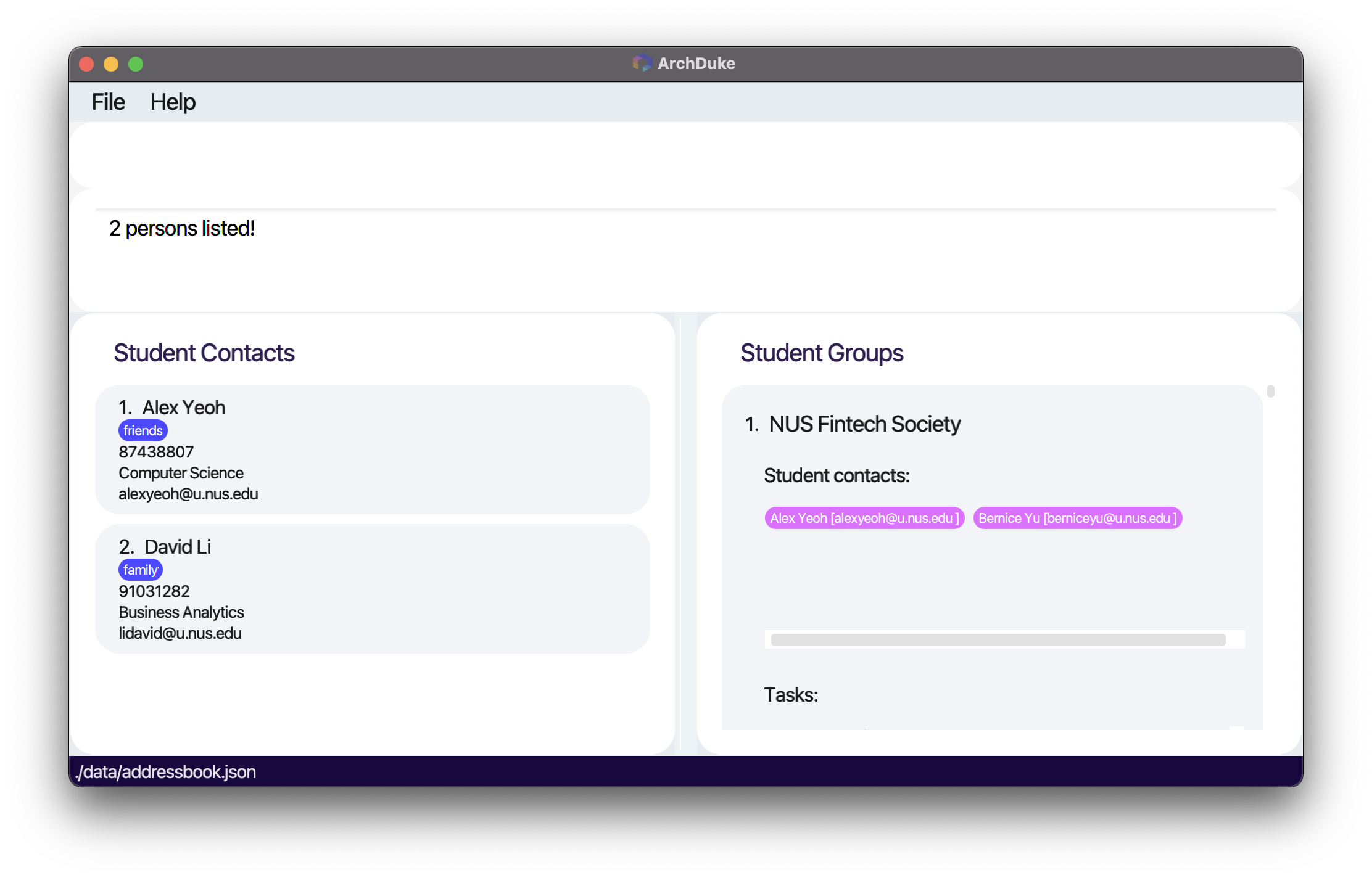
- Lists all student contacts that match with those attributes and displays the number of student contacts that match those keywords.
Find result for the command find n/alex david:
Student Group Management
Create a group: addgroup
Creates a group in ArchDuke. addgroup must be followed by GROUP_NAME, which can take any values,
and it should not be blank and should not have preceding whitespaces. GROUP_NAME with preceding white spaces
followed by words will be treated as if there is no preceding white spaces. E.g. Group is the same as Group.
Format: addgroup g/GROUP_NAME
- Adds a group with the name
GROUP_NAMEto the group list.
| Parameter | Representation | Constraints |
|---|---|---|
GROUP_NAME |
Name of the group to be added | Should not be blank and should not have preceding whitespaces |
Note:
A group can only be added if it has yet to exist in ArchDuke. The group
is uniquely identified by a GROUP_NAME with no regards to case sensitivity. E.g. NUS would be the
same group as Nus and nus
Example:
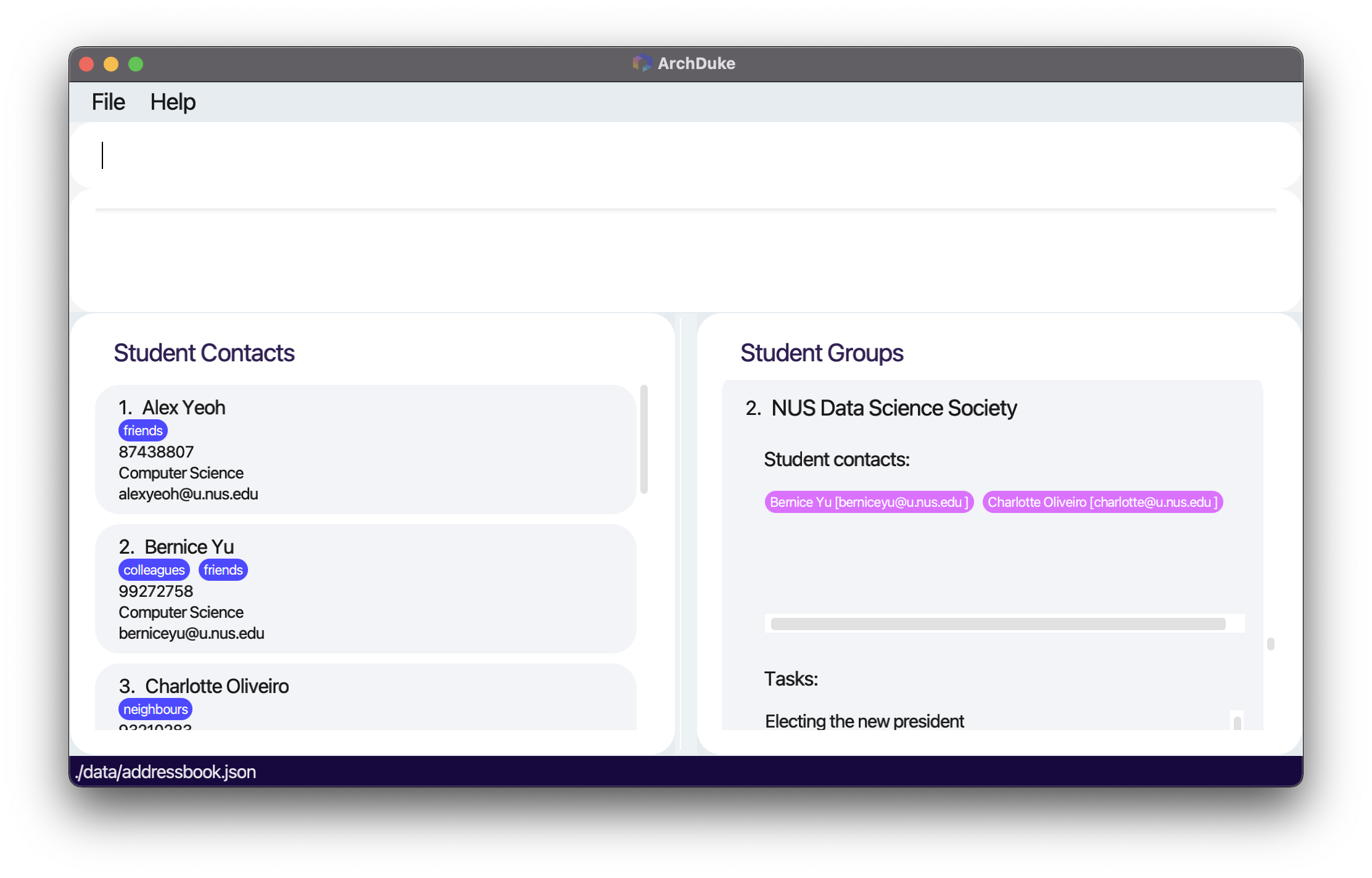
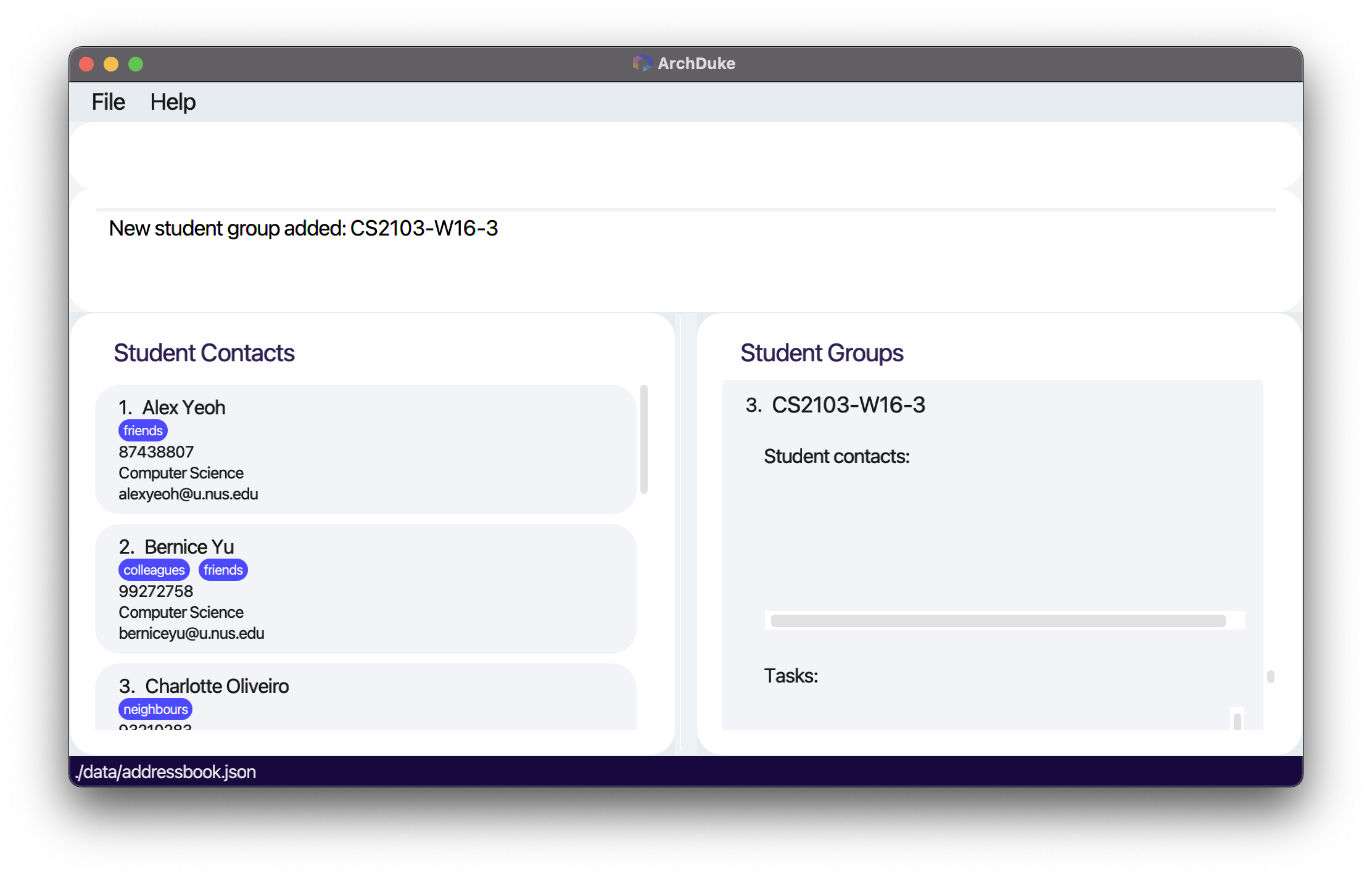
addgroup g/CS2103-W16-3
Expected outcome:
- Creates a group with the name CS2103-W16-3 to ArchDuke.
Before adding the group. Note that NUS Data Science Society is currently the last group in the list:
After adding the group CS2103-W16-3:
Delete a group: delgroup
Deletes a group from ArchDuke. The group must already exist in ArchDuke.
Format: delgroup g/GROUP_NAME
- Deletes the group with the name
GROUP_NAMEfrom the group list.
| Parameter | Representation | Constraints |
|---|---|---|
GROUP_NAME |
Name of the group to be deleted | Should not be blank and should not have preceding whitespaces |
Example:
delgroup g/CS2103-W16-3
Expected outcome:
- Deletes the group with the name CS2103-W16-3 from ArchDuke.
Assign a student to a group: assign
Assigns a student to an existing group in ArchDuke. assign is followed by the INDEX at which the student is
in the currently displayed ArchDuke student contact list and the GROUP_NAME in which the student would be assigned.
The group must already exist in ArchDuke, and the INDEX must be a positive unsigned integer
not exceeding the total number of currently displayed student contacts. The student contact must have yet to be currently assigned to the group.
Format: assign INDEX g/GROUP_NAME
- Assigns the student at index
INDEXto the group calledGROUP_NAME
Example:
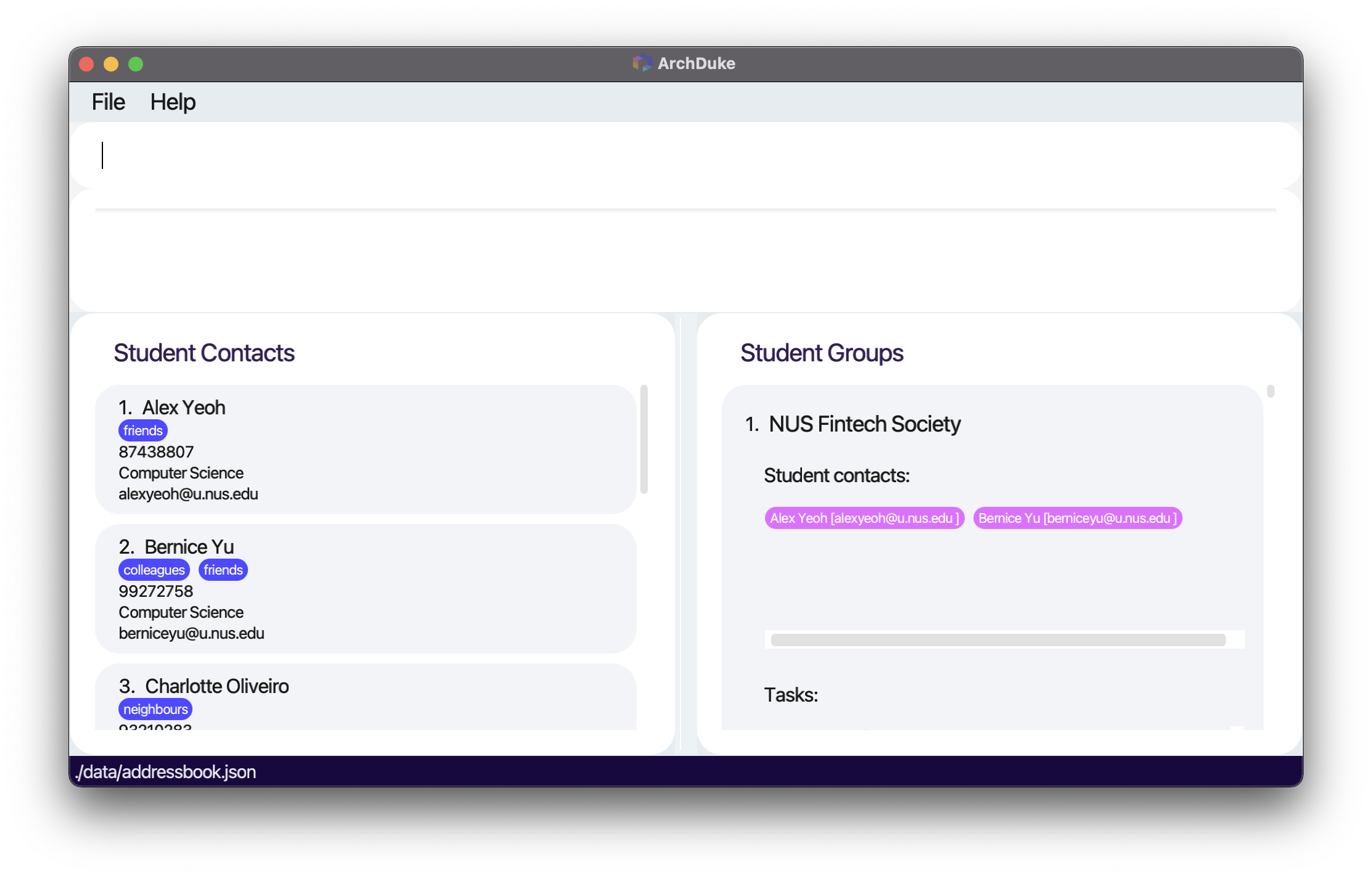
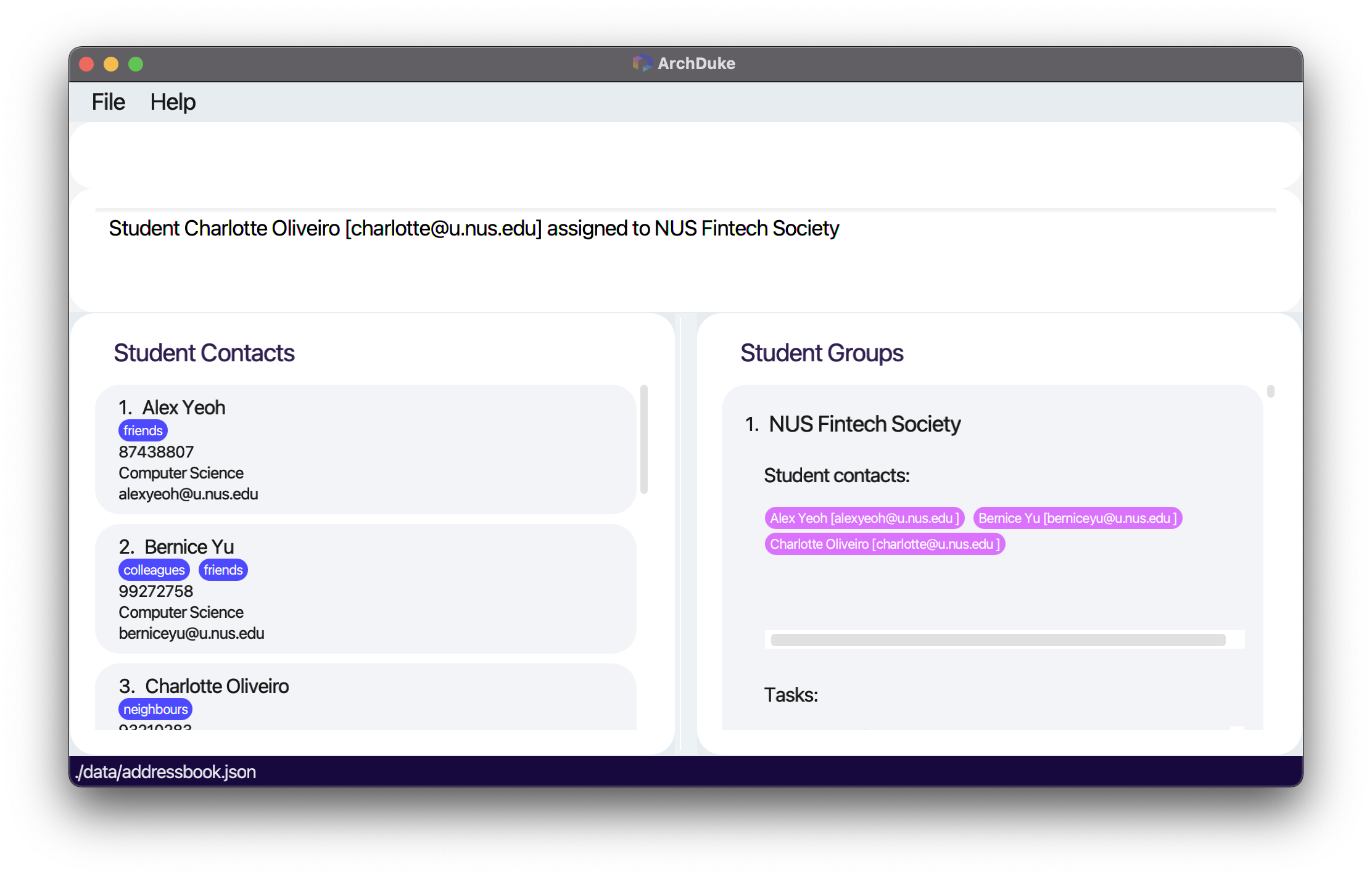
assign 3 g/NUS Fintech Society
Expected outcome:
- Assigns the specified student to the specified group.
Before assigning Charlotte at index 3 to the group NUS Fintech Society:
After assigning:
Deassign a student from a group: deassign
Deassigns a student from an existing group in ArchDuke. deassign is followed by the INDEX at which the student
is in the currently displayed ArchDuke student contact list and the GROUP_NAME in which the student would be deassigned.
The group must already exist in ArchDuke, and the index must be a positive unsigned integer not
exceeding the total number of student contacts. The student contact must be
currently assigned to the group.
Format: deassign INDEX g/GROUP_NAME
- Deassigns the student at index
INDEXfrom the group calledGROUP_NAME
| Parameter | Representation | Constraints |
|---|---|---|
INDEX |
The number in front of the student contact | Must be positive unsigned integer and must not exceed the size of the current student contact list |
GROUP_NAME |
Name of the group to be deassiged | Should not be blank and should not have preceding whitespaces |
Example:
deassign 1 g/NUS Fintech Society
Expected outcome:
- Deassigns the specified student from the specified group.
View student contacts in an existing group: viewcontact
Displays the student contacts from the specified group. viewcontact must be followed by a GROUP_NAME.
The group must already exist in ArchDuke.
Format: viewcontact g/GROUP_NAME
- Views all student contacts in the group called
GROUP_NAME
| Parameter | Representation | Constraints |
|---|---|---|
GROUP_NAME |
Name of the group to be viewed | Should not be blank and should not have preceding whitespaces |
Example:
viewcontact g/NUS Fintech Society
Expected outcome:
- Displays all the student contacts from the specified group.
Result of viewing student contacts in a group:

Student Group Task Management
Add a task in a group: addtask
Adds a task to the specified group. addtask must be followed by a TASK_NAME and a GROUP_NAME.
The group must already exist in ArchDuke. The task must not already exist in the specified group.
TASK_NAME can take any values except for that stated below in the limitation box,
and it should not be blank and should not have preceding whitespaces. TASK_NAME with preceding white spaces
followed by words will be treated as if there is no preceding white spaces. E.g. Meeting is the same as Meeting.
Format: addtask task/TASK_NAME g/GROUP_NAME
Note:
A task can only be added if it has yet to exist in the particular group. The task
is uniquely identified by a TASK_NAME with no regards to case sensitivity. E.g. MEETING would be the
same task as Meeting and meeting.
Limitation of task name:
Due to the limitation of the command format, a task name cannot contain the string g/ in the task if there are spaces before g/.
Examples of valid task/TASK_NAME
-
task/Meeting/finalizingis possible as there is no space beforeg/. -
task/Taskg/is possible as there is no space beforeg/. -
task/g/taskis possible as there is no space beforeg/.
Examples of invalid task/TASK_NAME
-
task/Create a group g/excois not possible as there is a space beforeg/. -
task/Create a group g/ excois not possible as there are spaces beforeg/.
- Adds the task called
TASK_NAMEto the group calledGROUP_NAME
| Parameter | Representation | Constraints |
|---|---|---|
TASK_NAME |
Name of the task to be added | Should not be blank and should not have preceding whitespaces. Also follows the TASK_NAME above-mentioned limitations |
GROUP_NAME |
Name of the group to be added to | Should not be blank and should not have preceding whitespaces |
Example:
addtask task/v1.2 user guide g/NUS Fintech Society
Expected outcome:
- Adds the specified task to the specified group. The task appears inside the group.
Before add task v1.2 user guide to the group NUS Fintech Society:
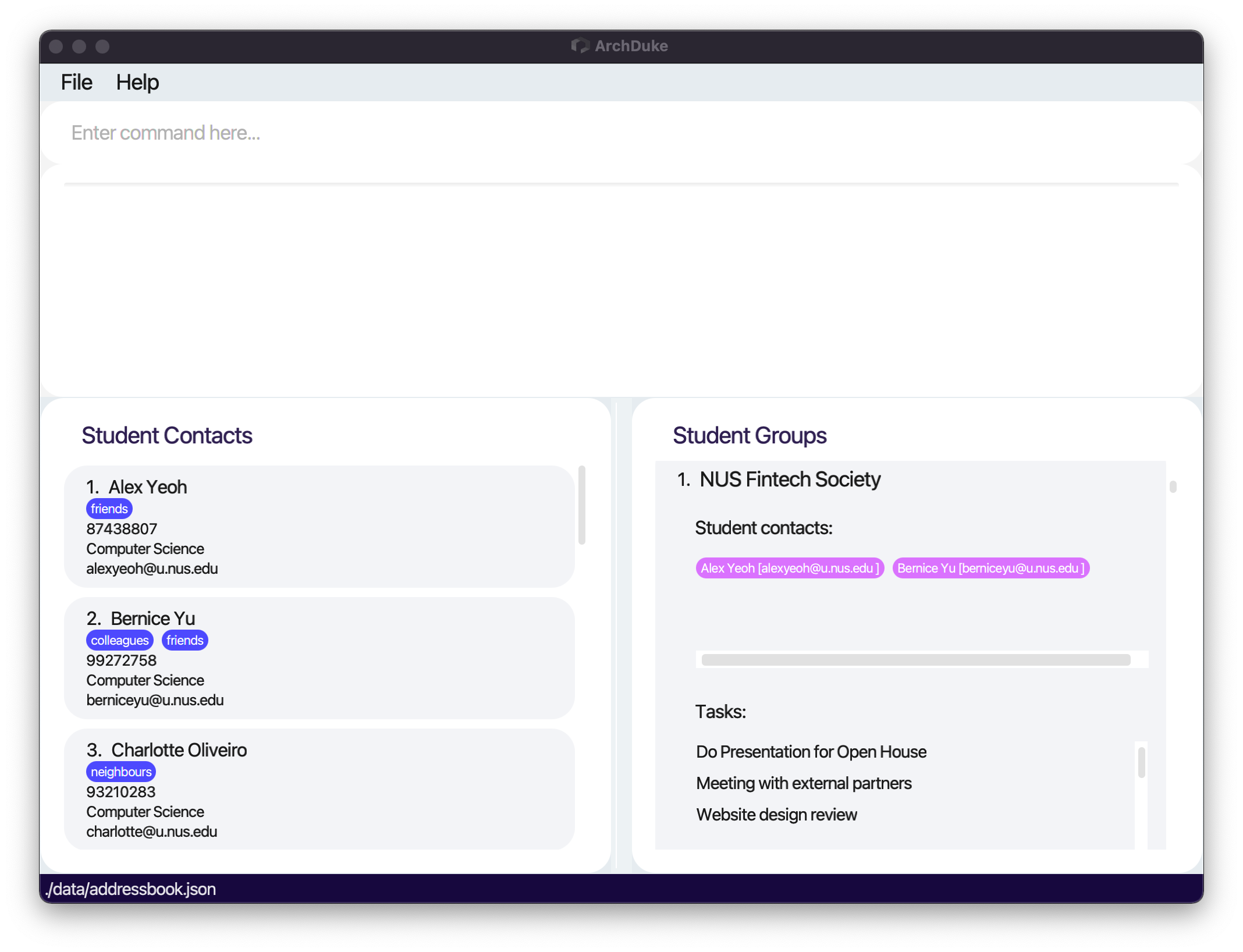
After add task:
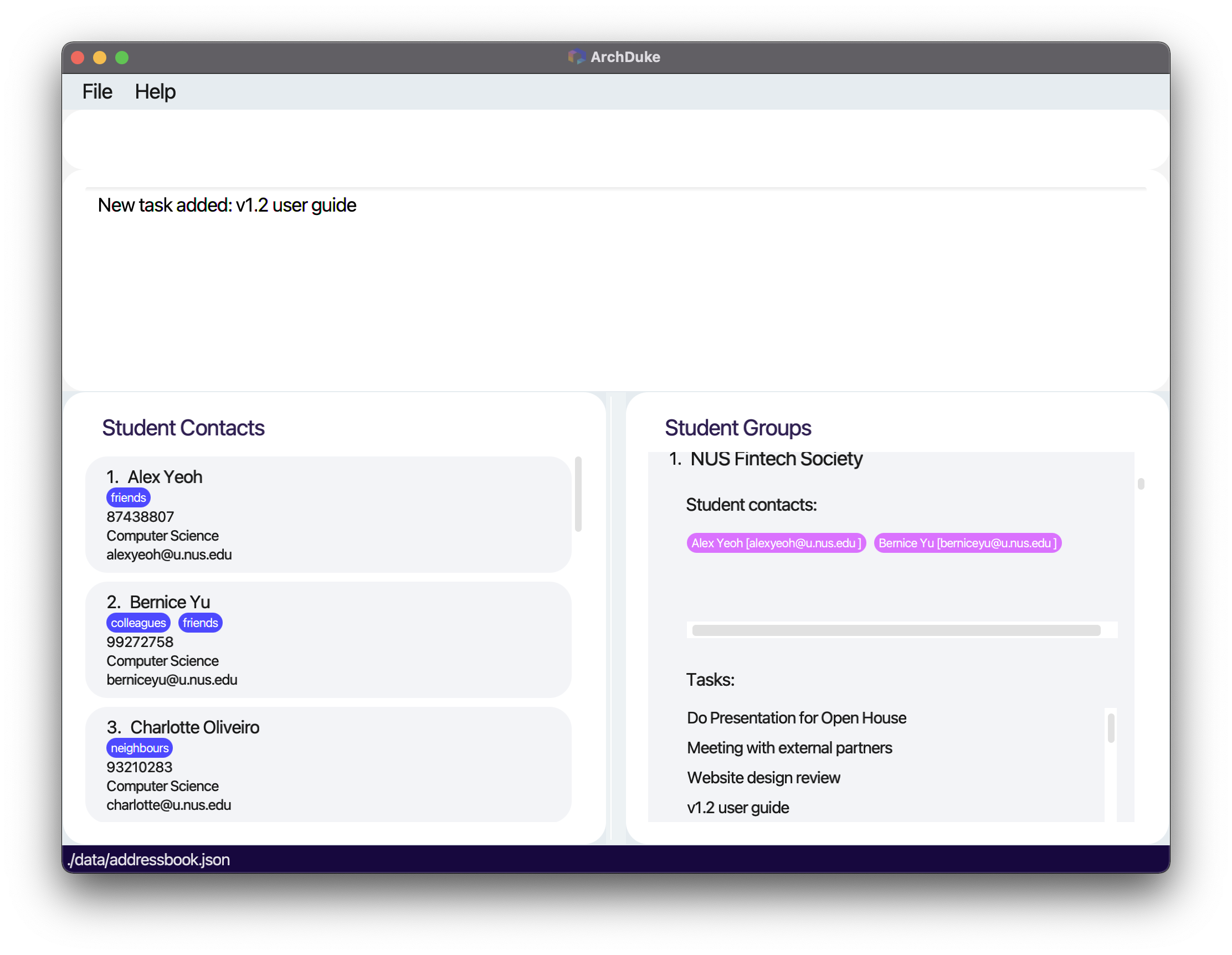
Delete a task in a group: deltask
Deletes a task from the specified group. deltask must be followed by a TASK_NAME and a GROUP_NAME.
The group must already exist in ArchDuke. The task must already exist in the particular group.
Format: deltask task/TASK_NAME g/GROUP_NAME
- Deletes the task called
TASK_NAMEfrom the group calledGROUP_NAME
| Parameter | Representation | Constraints |
|---|---|---|
TASK_NAME |
Name of the task to be deleted | Should not be blank and should not have preceding whitespaces. Also follows the TASK_NAME above-mentioned limitations |
GROUP_NAME |
Name of the group to be deleted from | Should not be blank and should not have preceding whitespaces |
Example:
deltask task/v1.2 user guide g/NUS Fintech Society
Expected outcome:
- Deletes the specified task from the specified group.
Displays the tasks in a group: viewtask
Displays the tasks from the specified group. viewtask must be followed by a GROUP_NAME.
The group must already exist in ArchDuke.
Format: viewtask g/GROUP_NAME
- Views all tasks in the group called
GROUP_NAME
| Parameter | Representation | Constraints |
|---|---|---|
GROUP_NAME |
Name of the group to be viewed | Should not be blank and should not have preceding whitespaces |
Example:
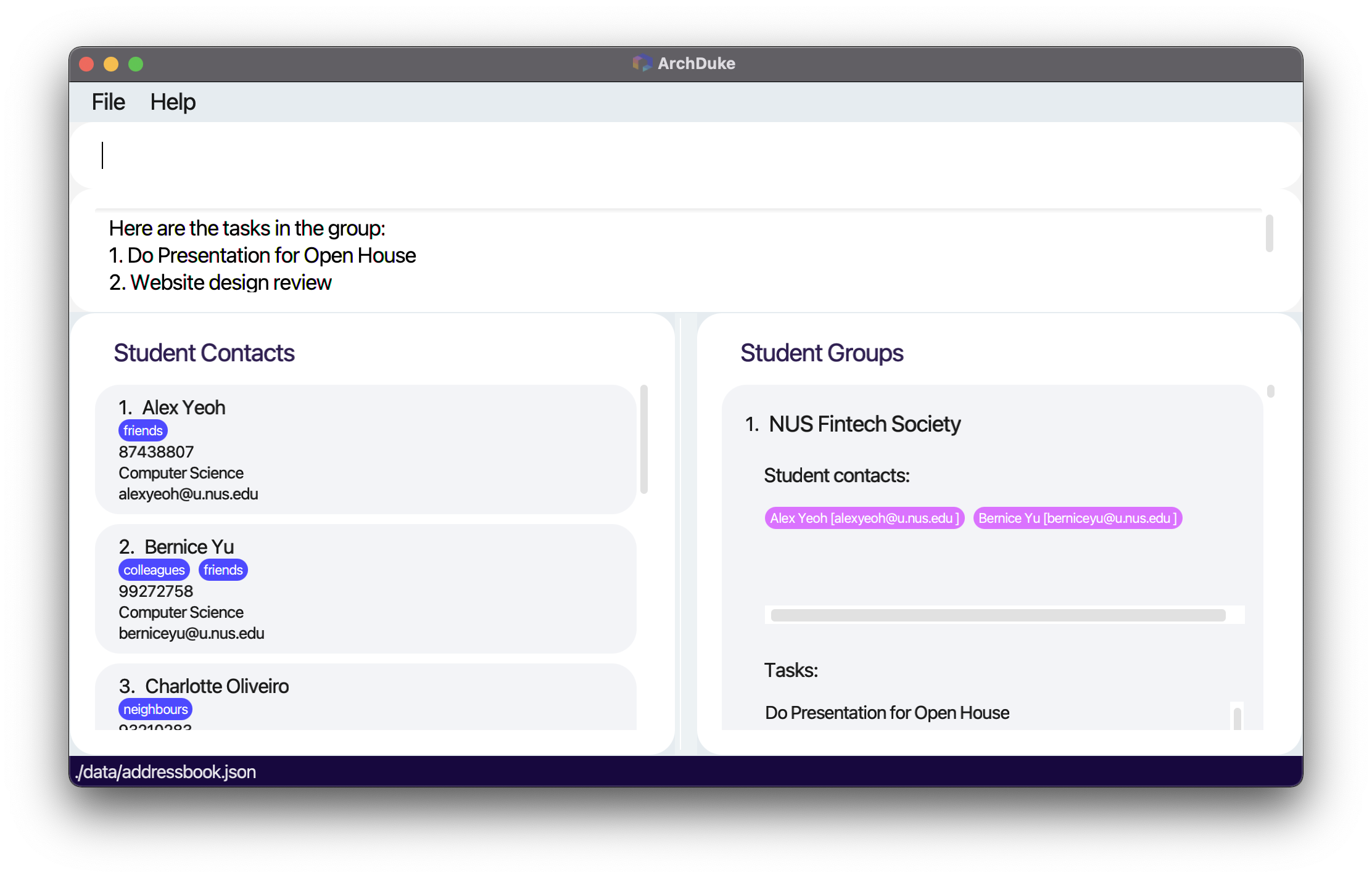
viewtask g/NUS Fintech Society
Expected outcome:
- Displays all the tasks from the specified group.
Result of viewing task in the group NUS Fintech Society:
FAQ
Q: How do I transfer my data to another Computer?
A: Install the app in the other computer and overwrite (i.e. replace) the empty data file it creates with the file
that contains the data of your previous ArchDuke home folder.
Q: When and why does ArchDuke use sample data?
A: ArchDuke uses sample data when the application is first launched. The purpose of the sample data is to
let the new user experiment with the data while getting familiar with ArchDuke. If you wish to start using ArchDuke
fresh from the start, you could use the clear command to clear all the sample data.
Q: What is an academic major?
A: An academic major is simply the major that the student is studying in university.
Q: What does an index refer to?
A: An index is simply the number in front of the student contact’s name. It specifies the order
in which the student contact appears in the list.
Q: What is an unsigned integer?
A: An unsigned integer is an integer that ranges from 0 to 4294967295 inclusive.
Command summary
General features
| Action | Format, Examples |
|---|---|
| View help | help |
| List all student contacts | list |
| Find name |
find n/KEYWORD [MORE_KEYWORDS]...e.g., find n/James Jake
|
| Find academic major |
find a/KEYWORD [MORE_KEYWORDS]...e.g., find a/Computer Science
|
| Find tag |
find t/KEYWORD [MORE_KEYWORDS]...e.g., find t/friends colleagues
|
| Find phone number |
find p/KEYWORDe.g., find p/12345678
|
| Find email |
find e/KEYWORDe.g., find e/example@u.nus.edu
|
| Clear entries | clear |
| Exit | exit |
Student contact management
| Action | Format, Examples |
|---|---|
| Add student contact information |
add n/NAME p/PHONE_NUMBER e/EMAIL a/ACADEMIC_MAJOR [t/TAG]... e.g., add n/John Doe p/12345678 e/johndoe@u.nus.edu a/Computer Science t/friends
|
| Delete student contact information |
delete INDEX e.g., delete 1
|
| Display the student contacts in a group |
viewcontact g/GROUP_NAME e.g., viewcontact g/CS2103-W16-3
|
Student group management
| Action | Format, Examples |
|---|---|
| Create a group |
addgroup g/GROUP_NAMEe.g., addgroup g/CS2103-W16-3
|
| Delete a group |
delgroup g/GROUP_NAMEe.g., delgroup g/CS2103-W16-3
|
| Assign a student to a group |
assign INDEX g/GROUP_NAMEe.g., assign 1 g/CS2103-W16-3
|
| Deassign a student from a group |
deassign INDEX g/GROUP_NAMEe.g., deassign 1 g/CS2103-W16-3
|
| Display student contacts in a group |
viewcontact g/GROUP_NAMEe.g., viewcontact g/CS2103-W16-3
|
Student group task management
| Action | Format, Examples |
|---|---|
| Add a task in a group |
addtask task/TASK_NAME g/GROUP_NAMEe.g., addtask task/v1.2 user guide g/CS2103-W16-3
|
| Delete a task in a group |
deltask task/TASK_NAME g/GROUP_NAMEe.g., deltask task/v1.2 user guide g/CS2103-W16-3
|
| Display the tasks in a group |
viewtask g/GROUP_NAMEe.g., viewtask g/CS2103-W16-3
|